The Best Sellers Protection feature helps you hide high-performing product sorting options from competitors, protecting your sales strategy and preventing unwanted analysis of your top-selling products.
By restricting access to best-selling data, you reduce the risk of competitors identifying and copying your winning products.
How to Set It Up
Step 1: Enable Lavar in Your Theme
Make sure the Lavar app embed is enabled in your Theme Editor first.
Please refer to this article for detailed instructions.
Step 2: Activate the feature Best Sellers Protection
Open Lavar in your Shopify Admin
Navigate to Store Optimizations → Best Sellers Protection
Click Activate feature and Save
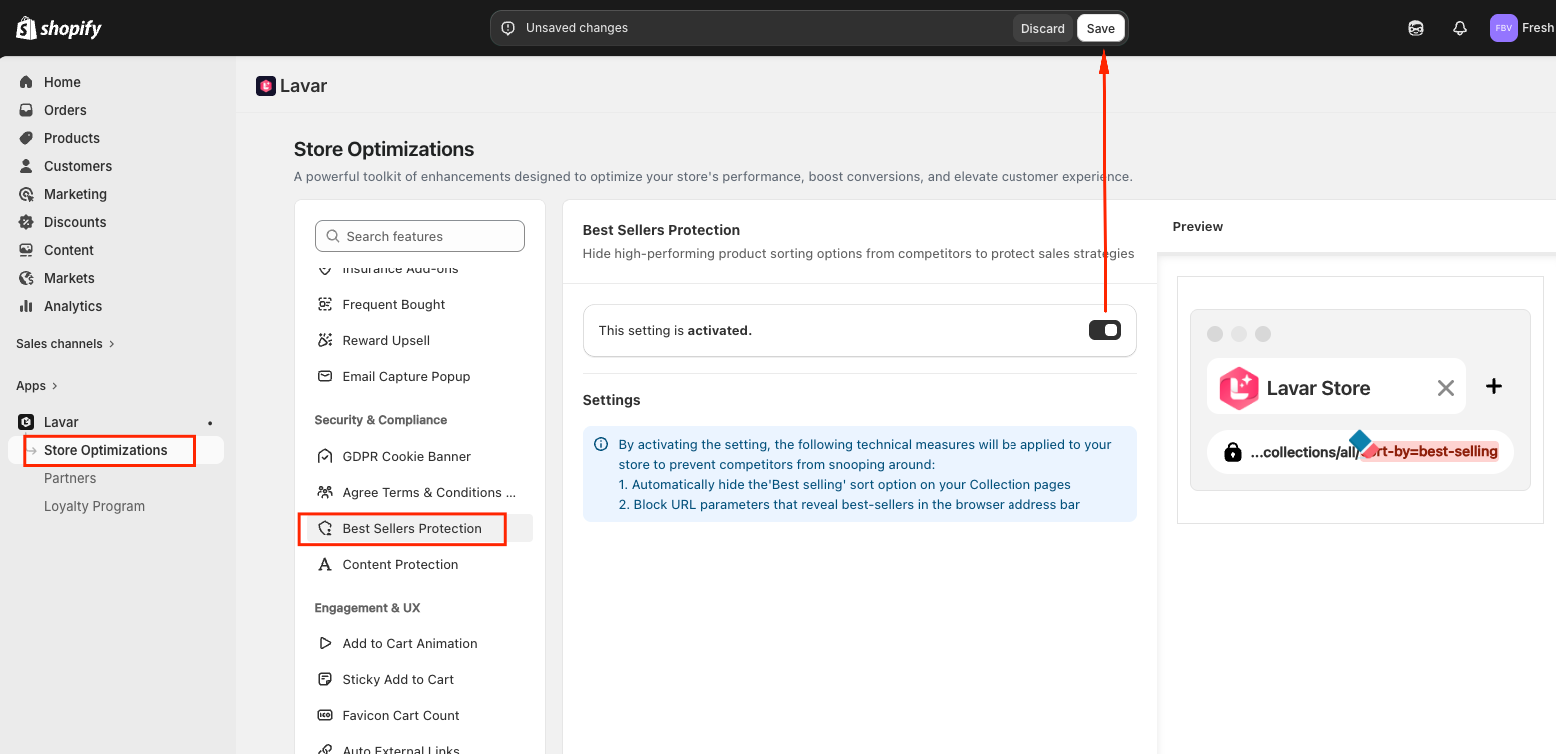
Note: By activating this setting, the following technical measures will be applied to your store:
Automatically hide the “Best selling” sort option on your Collection pages.
Block URL parameters that reveal best-selling products in the browser address bar.
These measures help prevent competitors from snooping around your store’s product performance.
If you need further assistance, please feel free to contact us at support@lavar.app or submit a ticket here.
Was this article helpful?
That’s Great!
Thank you for your feedback
Sorry! We couldn't be helpful
Thank you for your feedback
Feedback sent
We appreciate your effort and will try to fix the article